
Loading…
Student guide · மாணவர் வழிகாட்டி
From signing up to reviewing your results: follow these steps in order.பதிவு செய்வது முதல் முடிவுகளைப் பார்ப்பது வரை — இந்தப் படிகளை வரிசையாகப் பின்பற்றுங்கள்.
Need help? WhatsApp us · உதவிக்கு WhatsApp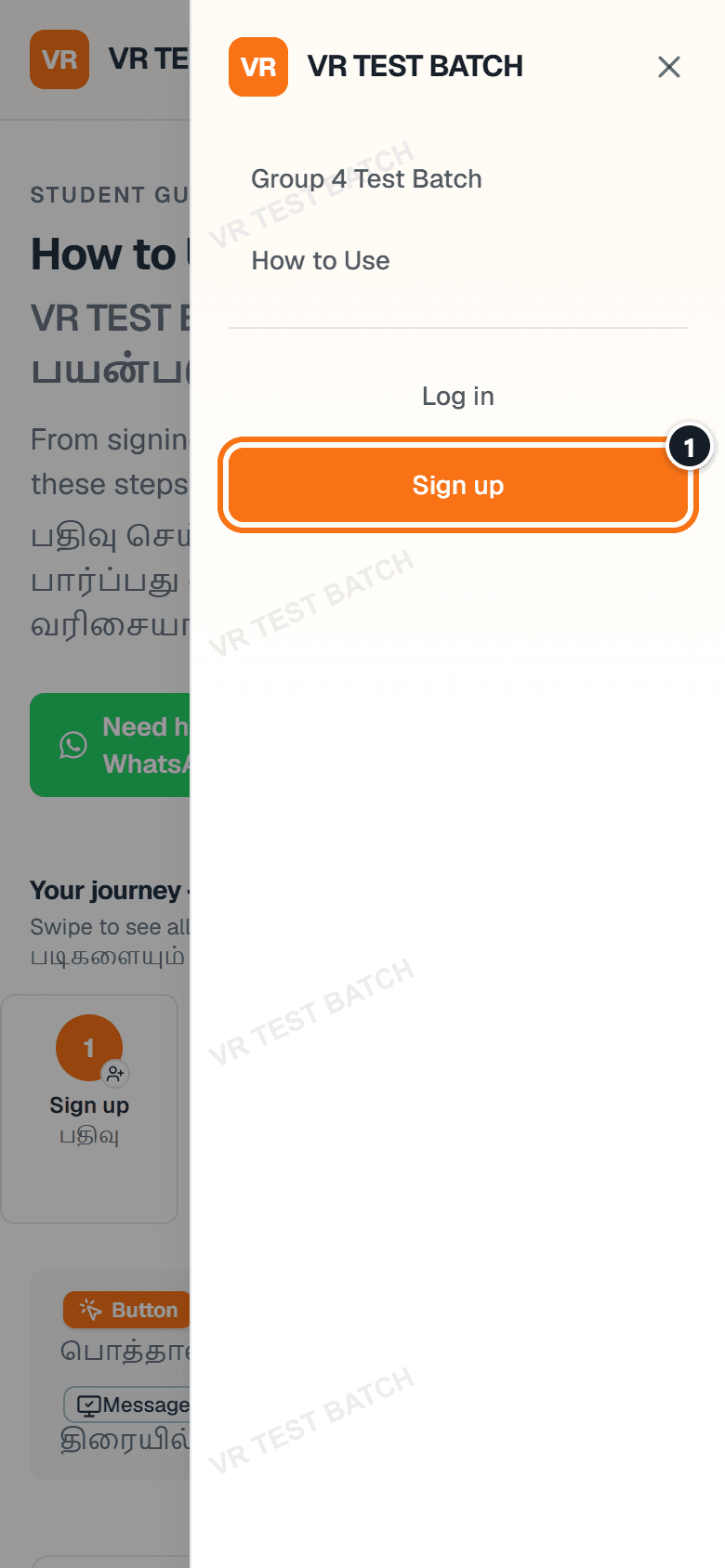
Swipe for the next screen → · அடுத்த திரைக்கு நகர்த்துங்கள் →
Numbers on the screen match the steps · திரையில் உள்ள எண்கள் படிகளுடன் பொருந்தும்
Step 1 of 9 · படி 1
Do this · இதைச் செய்யுங்கள்
Good to know · தெரிந்துகொள்ளுங்கள்
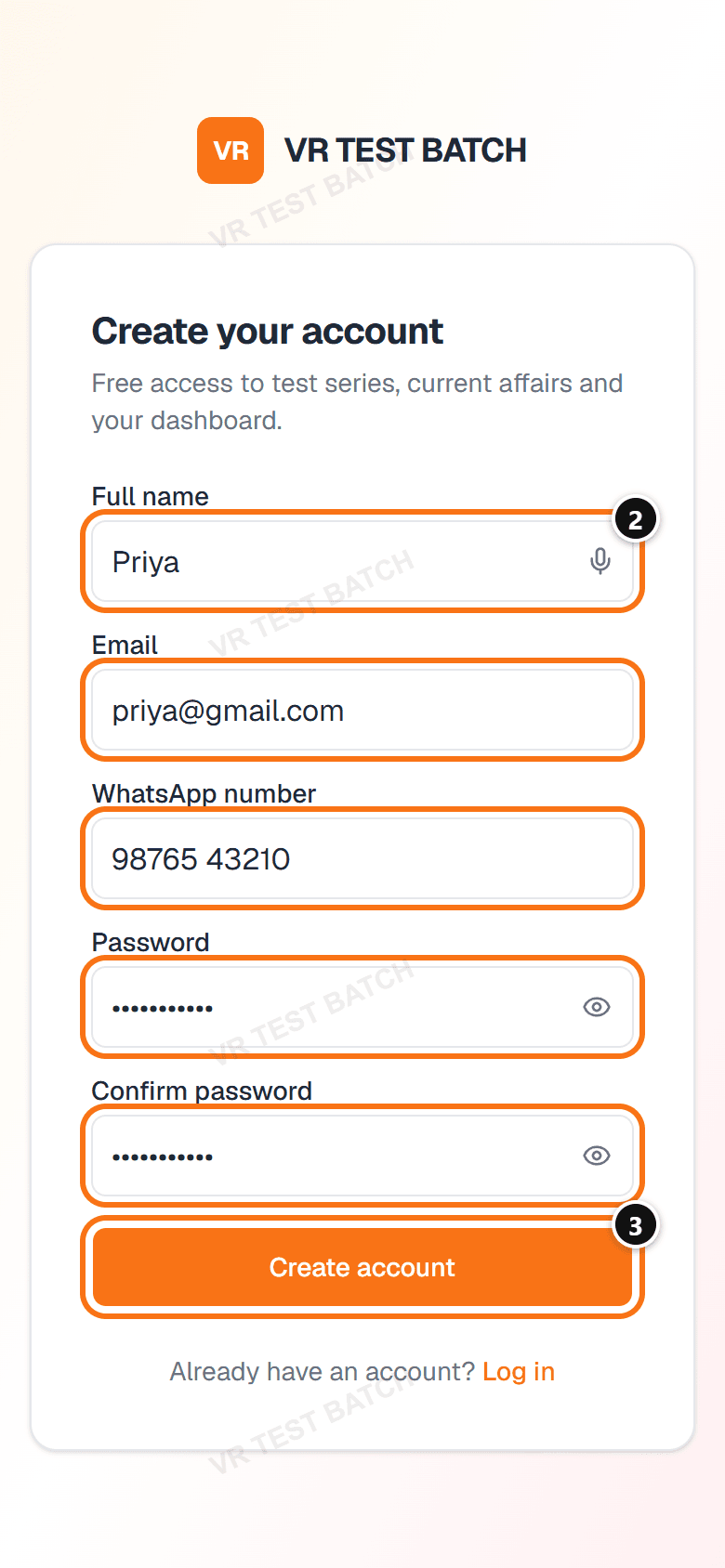
Numbers on the screen match the steps · திரையில் உள்ள எண்கள் படிகளுடன் பொருந்தும்
Step 2 of 9 · படி 2
Required: you cannot log in until your email is verified.கட்டாயம்: Email சரிபார்க்கப்படும் வரை Log in செய்ய முடியாது.
Do this · இதைச் செய்யுங்கள்
Good to know · தெரிந்துகொள்ளுங்கள்
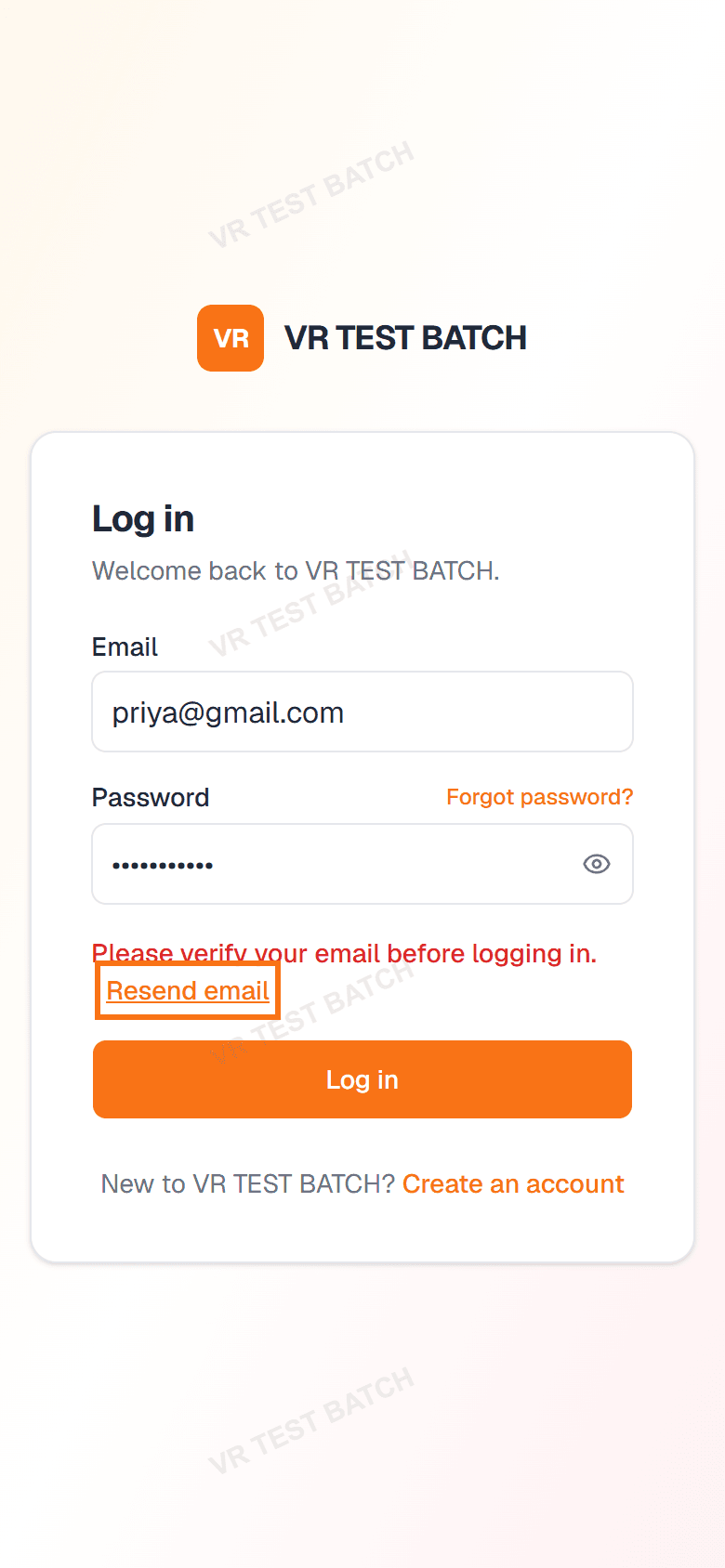
Numbers on the screen match the steps · திரையில் உள்ள எண்கள் படிகளுடன் பொருந்தும்
Step 3 of 9 · படி 3
Do this · இதைச் செய்யுங்கள்
Good to know · தெரிந்துகொள்ளுங்கள்
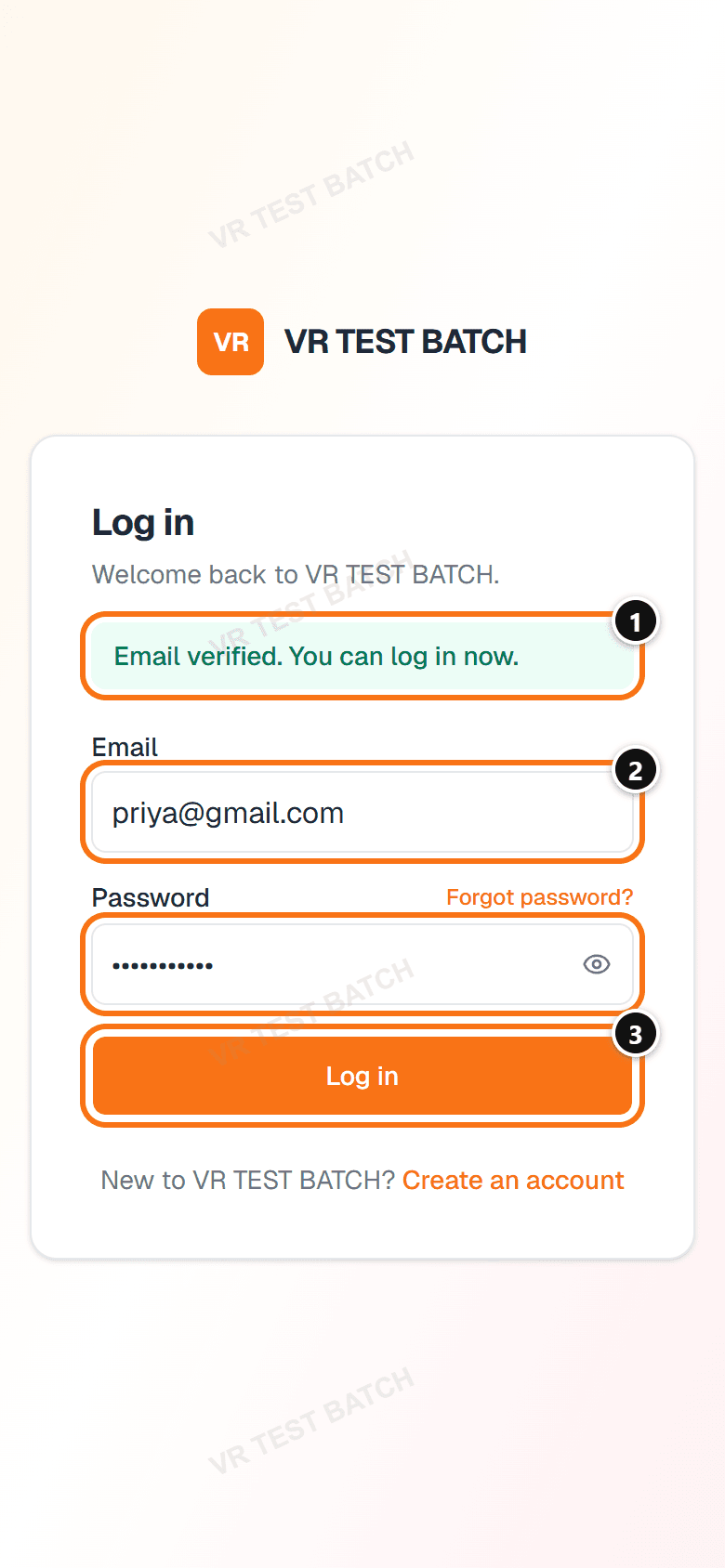
Numbers on the screen match the steps · திரையில் உள்ள எண்கள் படிகளுடன் பொருந்தும்
Step 4 of 9 · படி 4
Do this · இதைச் செய்யுங்கள்
Good to know · தெரிந்துகொள்ளுங்கள்
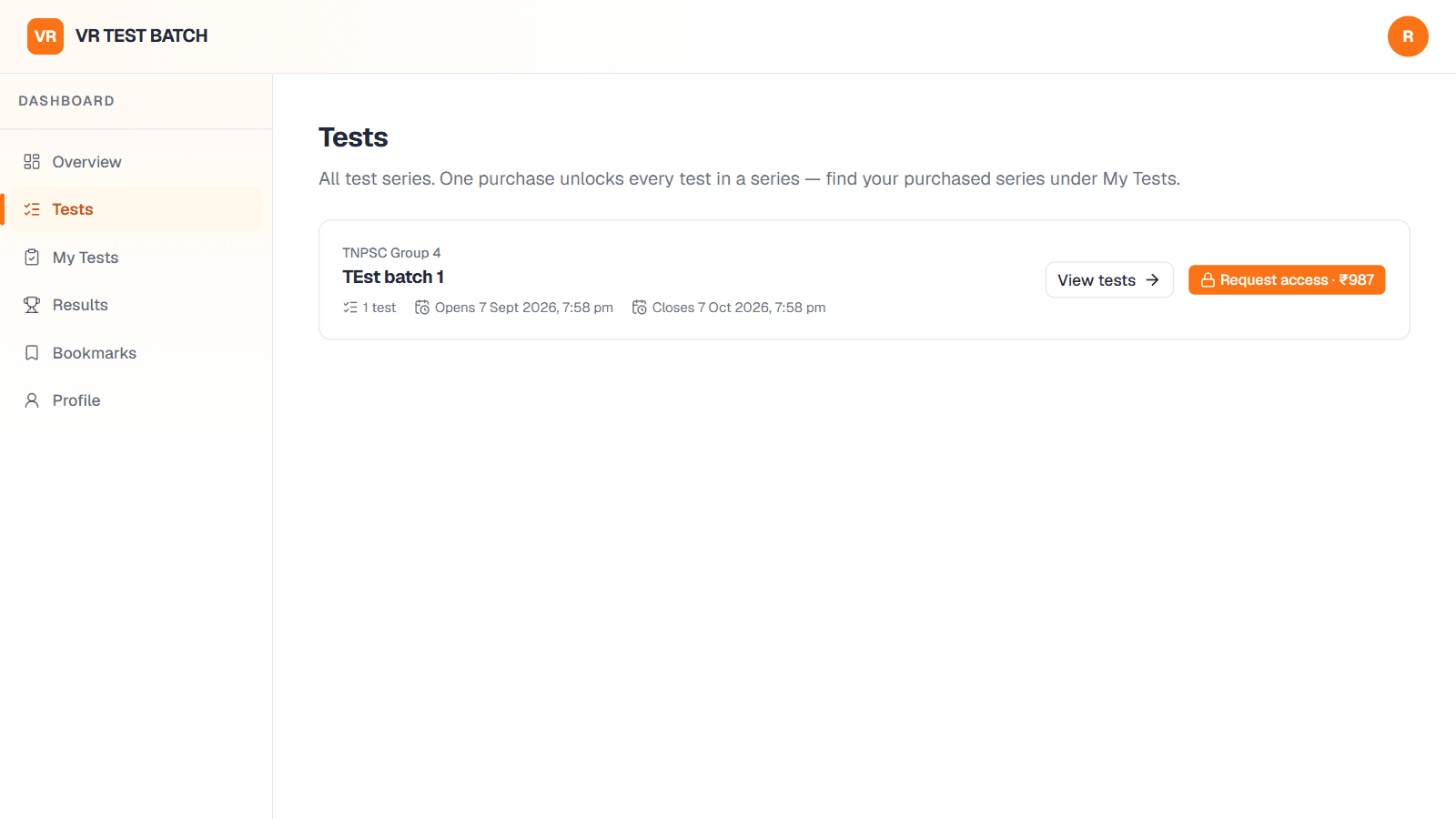
Numbers on the screen match the steps · திரையில் உள்ள எண்கள் படிகளுடன் பொருந்தும்
Step 5 of 9 · படி 5
Do this · இதைச் செய்யுங்கள்
Good to know · தெரிந்துகொள்ளுங்கள்
Numbers on the screen match the steps · திரையில் உள்ள எண்கள் படிகளுடன் பொருந்தும்
Step 6 of 9 · படி 6
Required: enter the correct UTR / transaction number, or we cannot match your payment.கட்டாயம்: சரியான UTR / Transaction எண்ணை உள்ளிடுங்கள். இல்லையெனில் உங்கள் Payment-ஐக் கண்டறிய முடியாது.
Do this · இதைச் செய்யுங்கள்
Good to know · தெரிந்துகொள்ளுங்கள்
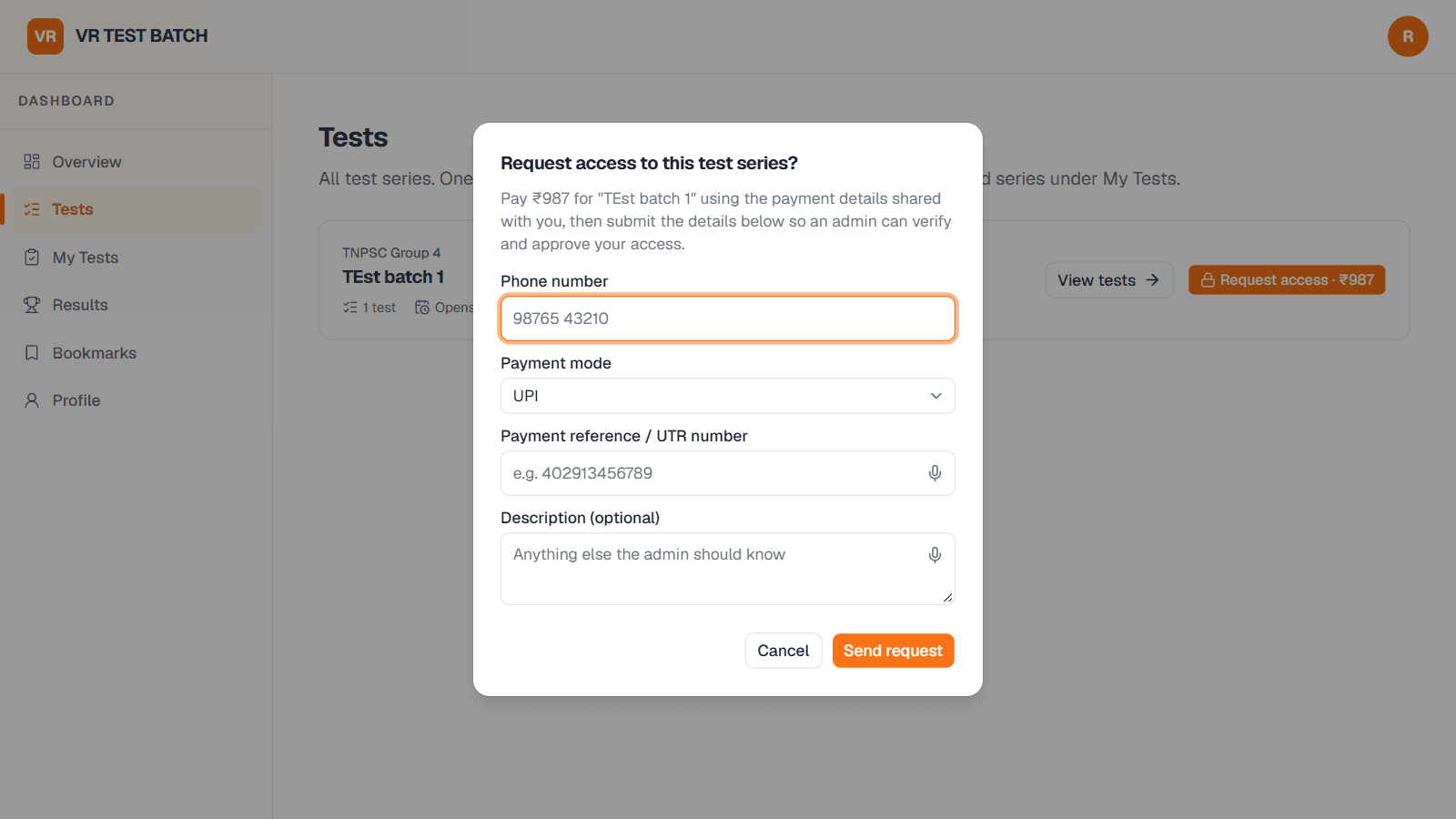
Numbers on the screen match the steps · திரையில் உள்ள எண்கள் படிகளுடன் பொருந்தும்
Step 7 of 9 · படி 7
The timer starts as soon as you click Start test and cannot be paused.Start test-ஐ கிளிக் செய்தவுடன் Timer தொடங்கும்; அதை நிறுத்த முடியாது.
Do this · இதைச் செய்யுங்கள்
Good to know · தெரிந்துகொள்ளுங்கள்
Numbers on the screen match the steps · திரையில் உள்ள எண்கள் படிகளுடன் பொருந்தும்
Step 8 of 9 · படி 8
Do this · இதைச் செய்யுங்கள்
Good to know · தெரிந்துகொள்ளுங்கள்
Numbers on the screen match the steps · திரையில் உள்ள எண்கள் படிகளுடன் பொருந்தும்
Step 9 of 9 · படி 9
Do this · இதைச் செய்யுங்கள்
Closing the tab or losing your connection does not stop the timer. Click Resume on the series page to continue.Tab-ஐ மூடினாலும், இணைய இணைப்பு துண்டித்தாலும் Timer நிற்காது. தொடர Series பக்கத்தில் Resume-ஐ கிளிக் செய்யுங்கள்.
Each answer is saved the moment you select it, so a page refresh won't lose your work.தேர்ந்தெடுத்த உடனே ஒவ்வொரு விடையும் சேமிக்கப்படும். பக்கத்தை Refresh செய்தாலும் விடைகள் இழக்கப்படாது.
Green numbers are answered, grey ones are not, and a flag marks questions you want to review.பச்சை எண்கள் விடையளித்தவை, சாம்பல் எண்கள் விடையளிக்காதவை. Flag குறி மீண்டும் பார்க்க வேண்டிய கேள்விகளைக் காட்டும்.
Questions show in English with the Tamil version underneath where available. Negative marks, if any, are shown next to each question's marks.கேள்விகள் ஆங்கிலத்தில், அதன் கீழே தமிழிலும் (இருந்தால்) காட்டப்படும். Negative மதிப்பெண் இருந்தால், அது ஒவ்வொரு கேள்வியின் மதிப்பெண்ணுக்கு அருகில் காட்டப்படும்.
Check your Spam or Promotions folder. Still nothing? Try logging in and click Resend email. If it still doesn't arrive, message us on WhatsApp with the email you signed up with.Spam அல்லது Promotions folder-ஐப் பாருங்கள். அப்போதும் இல்லையென்றால், Log in செய்ய முயன்று Resend email-ஐ கிளிக் செய்யுங்கள். அதன் பிறகும் வரவில்லை என்றால், பதிவு செய்த Email-உடன் WhatsApp-ல் தொடர்பு கொள்ளுங்கள்.
Paid access is approved manually after we check your UTR number. While it shows Pending approval, we haven't approved it yet. If it's been a while, send your phone number and UTR number to us on WhatsApp.உங்கள் UTR எண்ணைச் சரிபார்த்த பிறகே அனுமதி வழங்கப்படும். Pending approval என்று காட்டும் வரை இன்னும் Approve ஆகவில்லை. தாமதமானால், உங்கள் Phone எண் மற்றும் UTR எண்ணை WhatsApp-ல் அனுப்புங்கள்.
Open the payment in your UPI app (GPay, PhonePe, Paytm). It's the 12-digit number labelled UTR, UPI Ref No. or Transaction ID.உங்கள் UPI App-ல் (GPay, PhonePe, Paytm) அந்த Payment-ஐத் திறந்து பாருங்கள். UTR, UPI Ref No. அல்லது Transaction ID என்று குறிக்கப்பட்ட 12 இலக்க எண் அதுதான்.
No. Each test allows a single attempt, so your score reflects your first try.முடியாது. ஒவ்வொரு தேர்வையும் ஒருமுறை மட்டுமே எழுத முடியும்; உங்கள் முதல் முயற்சியின் மதிப்பெண்ணே கணக்கில் கொள்ளப்படும்.
Click Forgot password? on the login page and we'll email you a link to set a new one.Login பக்கத்தில் Forgot password?-ஐ கிளிக் செய்யுங்கள். புதிய Password அமைக்க Email-ல் ஒரு link அனுப்புவோம்.
Still stuck? Message us on WhatsApp at +91 88838 17277. We're happy to help with your account, payments or tests.இன்னும் சந்தேகமா? +91 88838 17277 என்ற எண்ணில் WhatsApp-ல் தொடர்பு கொள்ளுங்கள் — கணக்கு, Payment அல்லது தேர்வுகள் பற்றி உதவுகிறோம்.
WhatsAppContact usCreate account